| Updated: 27-Sep-2005 16:32 |  |
|
||||
|
|
|||||
|
Settings - Event Timing |
 |
|
|||
|
Event timers are your opportunity to trig other equipment with a well
defined timing: Event timers are subject to classification: Each available event timer may be set with a different delay and duration - or turned on/off - for each defined event class. The E-series MIO-boards all have two build-in timers (counters) that Mr. Kick uses for event timing. In the future the number of event timers may be increased by use of one or two dedicated timer board(s).
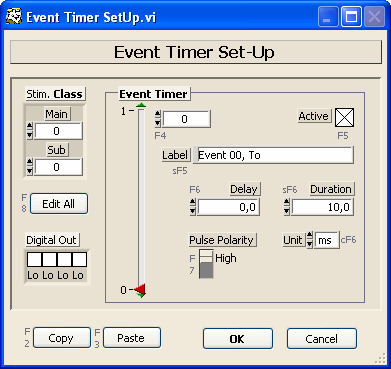
Which Event Timers are Active?In the upper left corner of the dialog you can set which event (or stimulus) class, Stim. Class, is displayed below and in the right hand side of the dialog. The number of classes available is defined under Settings - Classification: Set the Nmb Classes parameter, choose the Stimulus Type method and select the Act On - Event parameter. You choose the timer by moving the timer slider up/down or by typing
the timer number under the Event Timer heading: The timers are numbered
from zero to 21, only no. zero and one is available if no dedicated timer
board have been installed. For each class each timer can be turned on or off by setting the Active control. One exception is timer no. zero, which also controls the timing of sweep acquisition in the internal and external digital trig mode, and therefore can not be turned off. Note for external digital trig mode: Due to the small time slip between starting individual timers, some timers may catch an earlier trigger than the following. The Trig Ready/Gate signal, available at digital output line #6, may be used to blank out early triggers. Pulse Delay, Duration and PolarityEach active event timer will issue a single trig pulse per sweep. For each class and each timer you can set the following parameters:
After an acquisition the Delay and Duration parameters will show the values actually obtained: Both are subject to quantization, and there are limits to how much they can differ. The minimum delay or duration is 150 ns. Note for internal and external digital trig
mode: Event Timer no. 0 controls the delay of acquisition of sweeps,
i.e. the delay set for this timer will also be the delay from an incoming
trigger to time zero in any sweep! - Event Timer no. zero can not be
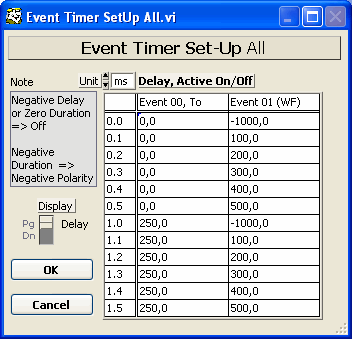
turned off! Note for external analog trig mode: Data acquisition can not be delayed in this trig mode, i.e. preconditioning stimuli are not available. On the positive side event timer no. zero is free for other purposes. Edit All
|
|
||||
|
|
|
|
 |
|
|